What it does
This is the operational core for a multi-vendor marketplace: the part that takes a single customer order, splits it per vendor, and tracks each portion through its own fulfilment lifecycle. When an order contains items from more than one vendor, the system creates a separate order split for each, so a vendor sees and works only their own lines. It moves orders and splits through documented states — from scheduled and unfulfilled, through in_fulfillment, partial and full fulfilment, hold, cancellation and restock — and records who acted at each transition from the session, not from the request body.
It calculates shipping cost itself: billable weight is the greater of actual and dimensional weight, and DIM weight is derived from package dimensions and a divisor. It is not wired to a carrier — it computes a figure, it does not buy a label or look up tracking. Where most of the value sits is in what it will not let through: a fulfilment cannot be marked without a shipment record carrying a tracking number, and a cancellation before shipment voids the associated pick task instead of leaving a box to go out the door.
The 6 process chains
Each chain is a route a record travels. What matters as much as what it does is what it refuses — those refusals are wired into the state transitions, not offered as guidance.
F1
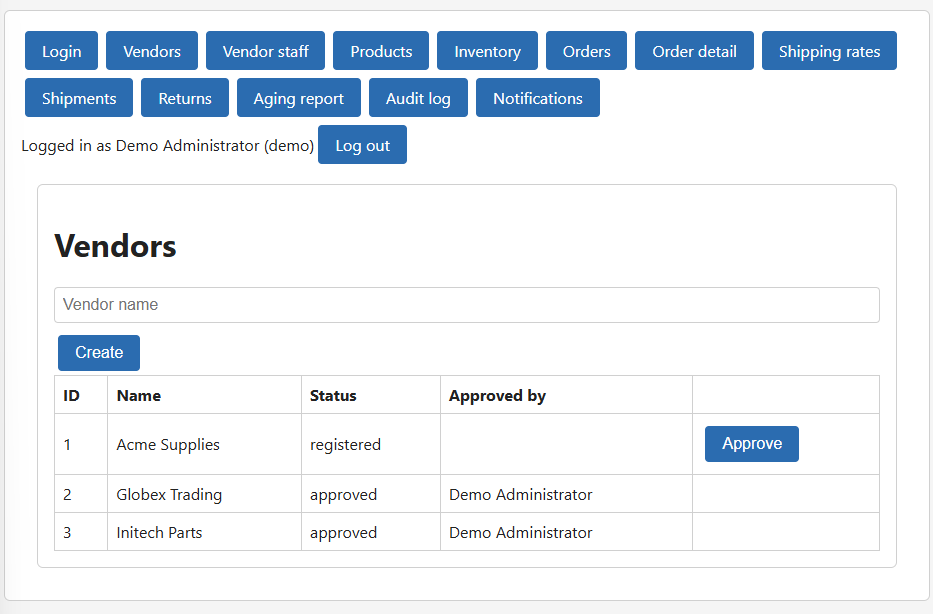
Approving vendors before access
Staff
A staff member reviews a vendor registration and approves it. Until that approval, the vendor account exists but cannot log in. On approval, the system records the approving staff member's name from the session, and once live the vendor manages only their own order lines after a split.
It refuses
- Login fails while a vendor is still registered; it succeeds only after a staff member approves.
- approved_by_name is set to the logged-in staff member even when the request body sends a different name.
- A vendor attempting product approval receives 403; a merchant receives 200.
F2
Approving products for the storefront
Merchant
A vendor submits a product, and it stays out of the storefront until the merchant approves it. The merchant controls what goes live. On approval the approving identity is taken from the session. The same flow covers the shipping-cost calculation the product data feeds into.
It refuses
- approved_by_name is the merchant from the session even when the body carries a different name.
- For a 12×12×12 package with divisor 139, DIM rounds to 13: with actual weight 5 the billable weight is 13, with actual weight 20 it is 20.
F3
Driving the order lifecycle
SysteemOperations / warehouseOperations / StaffCustomer service / StaffSysteem / warehouse
The system advances an order through its states: it becomes unfulfilled when the fulfillment date is reached, moves to in_fulfillment while a warehouse picks and packs, and reaches partially_fulfilled or fulfilled as line items ship. Staff can place an order on hold and release it back to unfulfilled. Customer service can cancel before shipment, and cancelled orders move to restocked once every item is returned to available inventory.
It refuses
- A hold blocks fulfilment until released; inventory can remain reserved during the hold.
- Cancellation before shipment must void the associated pick task rather than leave a shipment to proceed.
F4
Splitting orders by vendor
Systeem
When a received order contains products from more than one vendor, the system splits it automatically into one order split per vendor. Each vendor then sees only their portion. An order with items from a single vendor is not split.
It refuses
- An order with items from two vendors produces two order_splits and split_status split; an order with one vendor produces no split.
F5
Fulfilling each vendor split
Operations / warehouseCustomer service / Staff
Each vendor split runs its own fulfilment lifecycle. The warehouse moves a split into in_fulfillment, then to partially_fulfilled as some lines ship and fulfilled once all lines of that split ship with a valid tracking number. If the order is cancelled before shipment, the corresponding split pick task is voided.
It refuses
- Shipping part of a vendor split sets it to partially_fulfilled; shipping the rest sets it to fulfilled.
- A split reaches fulfilled only when its lines ship with a valid tracking number — a fulfilment without a shipment record is not accepted.
F6
Processing returns and restock
Operations / warehouseStaff
Operations record a requested return as received once the physical goods arrive, then move it to restocked when the returned quantities are put back into available inventory. Staff can reject a requested return. Restock and rejection are gated on permissions, and the acting identity is recorded from the session.
It refuses
- A user without can_restock receives 403 when attempting a restock.
- A user without the required permission receives 403 when rejecting an RMA.
- On restock, available_qty increases by the returned quantity, restocked is set, and processed_by_name is the logged-in user.
What this is not
This system carries no certification, audit or approval of any kind. It calculates shipping cost but is not connected to any carrier: there is no label purchase, no negotiated rate and no tracking lookup — a tracking number is a value you record, not one this system obtains. It handles no payment data, so nothing here falls in PCI-DSS scope, and it stores no addresses, email addresses or phone numbers — a marketplace that adds those takes on data-protection obligations this code does not cover. It is not certified or approved by any marketplace platform, and nothing in it has been audited against a customs or export regime. This is a starting point that implements documented rules, not a compliant system.
The rules here come from 17 business rules drawn from 42 that were examined, all 17 in scope. They are sourced from operational and marketplace documentation, not from a legal or regulatory standard, and the citations are English-language vendor and logistics references. This defines how far the implementation reaches: the state machine, the splitting logic and the shipment and cancellation guards. Anything beyond those rules is outside what this code does.
The database layer uses Node's built-in SQLite module, which is still marked experimental and prints a warning on every start. Fine for a reference implementation; you will likely want to swap it before production.
Known and accepted
- Some screens (order detail, audit log) can be opened without signing in. They show no data. Opening a screen without a session yields nothing: all 15 read routes refuse a request without a token, and the app sends you back to the sign-in screen on a 401. What you see is an empty screen, not a data leak. Hiding those screens on the front end is an improvement, not a defect in the core promise; accepted for a prototype.
- The shipments screen does not show which product a shipment is for: the table lists id, order, split, tracking number, weight, cost and who did it, but no product name. A shipment can cover several order lines of one order, so there is no single product to put in the table; the link runs through the order lines. A product column would be empty or misleading for an ordinary shipment. The tracking number is the carrier's number — the proof that something actually left the building, which is the core of the promise — and since it is free text you can use it to recognise your own line. Showing the product on the shipment list is an improvement, not a defect in the core promise; accepted for a prototype.
- The inventory screen shows only a product id, not a product name or SKU, so you need to know the ids to tell which stock line belongs to which product. Same kind as the shipments screen, and the same weighing: awkward to read, but it does not touch the core promise and blocks nothing. The lesson is recorded for the pipeline: a list screen should carry a recognisable column.
- The acceptance tests are written in Dutch, while the rest of the application is English. The three tests added during the review are in English; the thirteen acceptance tests from the build remain Dutch. Translating them by hand would touch the frozen test suite this release rests on, and a translation is not a functional improvement worth that risk. Accepted for this product; for the next products it is fixed at the source.
- The order detail screen shows buttons the signed-in user is not allowed to use: an operations user sees 'Release hold' and gets 'insufficient permissions' when clicking it. Left as is (decision of 2 September 2026). The screen derives its buttons from the status of the order, not from the rights of the signed-in user; both are needed to know what someone may do. The server refuses correctly with a 403 and a readable message, so nothing goes wrong — it costs a user one click to find out they lack the right. Hiding buttons per right is an improvement, not a defect in the core promise.
- Two API routes have no screen: GET /api/roles and POST /api/users would need a user-management screen that was never specified. Neither touches the core promise. The three return routes that the automated check could not assess are used: in the running app Receive, Reject and Restock were clicked and the return moved from requested to received to restocked.
- Shipment lines can only be seen through their shipment (GET /api/shipments/:id), not as a list of their own — outside their shipment they have no meaning. Return RMAs do have their own list (GET /api/returns) and the returns screen shows them.
- Weighed per field: name, SKU, dimensions, weight, customer name, order reference, order and order-line ids and quantity are known at creation and belong there. Only the scheduled date of an order might change later (rescheduling); that is an extension, not a defect.
- A handful of source files use Dutch names and comments: 6 of the 44 source files outside the tests, mostly the server bootstrap, the seed and the API client. The user interface and the API are English. Accepted as is: it is confined to a few files and does not affect how the system runs. You may come across some Dutch when you read the bootstrap code. The price is unchanged.
Price
Both tiers contain exactly the same code. The only difference is how often you may use it. Either way you sell what you build with it, not the code itself.
Single project
$1,000
Use this code in one system, for yourself or for one client.
Unlimited
$2,500
Use it in as many systems as you like, for yourself or for clients.
Read what this is not before you buy: 9 known limitations, weighed and accepted.
Checkout opens shortly. To buy now, or to ask anything first, write to groundworkcode@outlook.com.
You may not resell this as source code, in whole or in substantial part, modified or not. What you build with it is yours to sell. The full licence ships with the archive.